
User Roles Types
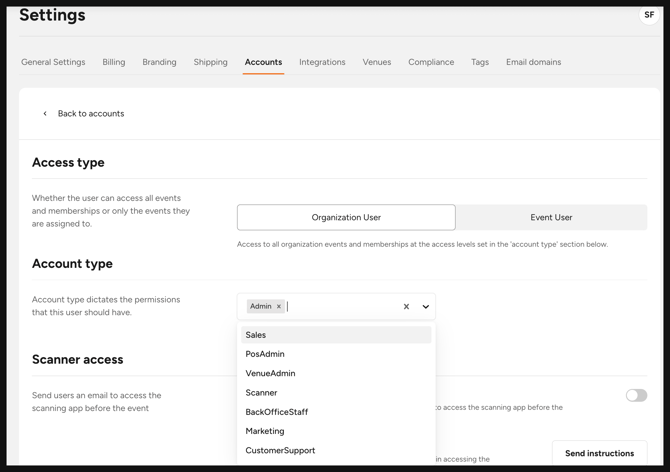
To see which accounts have access to specific features and data, go to 'Settings' and select the 'Accounts' tab.
There are two access types in Flicket:
1. Organisation User
Has access to all events and memberships within the organization, based on the permissions set in the Account Type section below.
2. Event User
Can only access basic reporting for the specific events they’re assigned to.
| Role | Access | Other notes |
|---|---|---|
| Admin |
Home
Events
Memberships
Seasons
Points
Orders
Customers
Broadcast
Reporting - all reporting types - for all events and all memberships
Point of Sale
POS Reporting
Marketing
Scout
Automation
|
|
| VenueAdmin | Reporting - Scan Report & Capacity Report only | |
| Sales | Orders (Only access to the created order) Customers Scout Automation |
You cannot issue comps.
|
| PosAdmin | Point of Sale POS Reporting Reporting - Scans only Scout |
|
| Scanner | Only access to the scanning app log in | |
| Marketing |
Broadcast Reporting - Audience and Marketing tab only |
|
| BackOfficeStaff |
Orders
Customers
Reporting - all reporting types - for all events and all memberships
Scout
|
|
| EventManager |
Events (they can access only the events I have created and have been assigned to by Admin)
Orders
Reporting (only the events I have created and have been assigned to by Admin)
Broadcast
Settings - Venue only
|
To assign an event manager additional events outside of the ones they have created, navigate to event user and add additional events.
|
| Role | What do they have access to | Things to note |
|---|---|---|
| EventReporting (events) | Sales Report, Scans Report, Capacity Report, Promotions Report for only the Events they have access to | When the Admin invites a user to become Event User, they will need to assign specific events (reporting) they can have access to |
| EventReporting (memberships) | Sales Report, Scans Report, Capacity Report, Promotions Report for only the Memberships they have access to | When the Admin invites a user to become Event User, they will need to assign specific memberships (reporting) they can have access to |
| SubPromoter | “Events” tab in Reporting that only shows face value of ticket sales | When the Admin invites a user to become Event User, they will need to assign specific events (reporting) they can have access to. |